
Sonic Screwdriver
A multitool that’s sonic
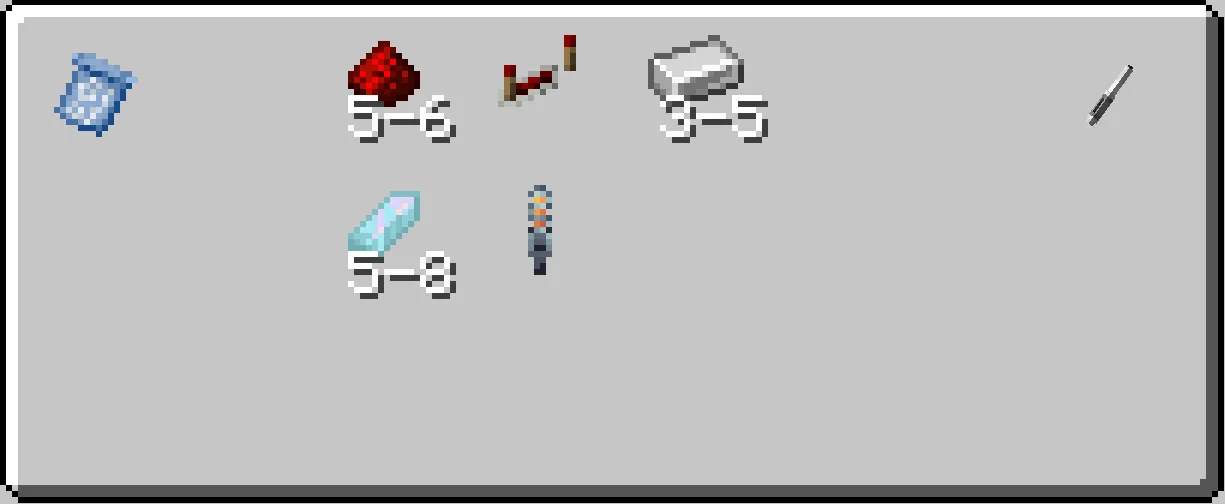
The Sonic Screwdriver is a handheld device used for various tasks, these tasks ranges from seeing what each control on the console does, to blowing up TNT. You’ll need a blueprint found in chests to craft the sonic screwdriver.
Recipe
To link a Sonic Screwdriver to a TARDIS Console right-click on the Sonic Port whilst holding the Sonic Screwdriver.
To remove it punch the Sonic Screwdriver in the Sonic Port, and it will eject from the Console.
To charge a Sonic Screwdriver insert it into a TARDIS Console (you can also Right Click on a rift OR an artron collector to charge it too) like you would for linking it to the TARDIS then, the Sonic Screwdriver should start charging (keep in mind the Sonic Screwdriver uses the Artron Energy to charge).
The sonic has 5 modes, those being:
- Inactive (Powered Off)
- Interaction
- Overload
- Scanning
- TARDIS
To change between modes, hold Shift and Right click at the same time.
Inactive Mode
Inactive mode renders the Sonic Screwdriver unusable.
Interaction Mode
Interaction mode allows the Sonic Screwdriver to:
- Ignite candles, campfires and unlit torches, open iron doors/trap doors
- Change repeaters' delay and mode.
Overload Mode
Overload mode allows the Sonic Screwdriver to:
- Ignite TNT,
- Toggle redstone lamps,
- Shatter glass blocks.
Scanning Mode
Scanning mode allows the Sonic Screwdriver to:
- Tell you what controls you’re looking at on the console are by hovering over the Control Entities. It will also show you their hitboxes. (the latter is off by default; check the config.
- Check if you are located inside a Rift Chunk and how much Artron Energy is stored in that chunk.
- In addition, hovering over a generalized subsystem core will tell you both the name and the durability of the subsystem that it holds. (If a particular subsystem can't lose durability it will only show the name.)
- You can also scan blocks and entities for info such as: health, required mining tool, and blast resistance.
- It also allows the ability see where your TARDIS is by
right clickingon a Zeiton Cluster or Bell blocks.
TARDIS Mode
TARDIS mode provides the following features:
- When inside the TARDIS with the sonic in your offhand:
- Looking up and using the sonic triggers demat.
- Looking down and using the sonic activates the handbrake and refueler.
- When outside the TARDIS:
- You can summon the TARDIS by
right-clickinga valid landing spot near you, which needs to be within 256 blocks of the TARDIS exterior. However you also need the "PILOT" rank (loyalty). - Looking up (with the sonic in the off-hand) and using the sonic will trigger the demat.
- Looking down (with the sonic in the off-hand) and using the sonic activates the handbrake and refuels the TARDIS.
- You can summon the TARDIS by
By default, you receive the “Prime” when crafting it or by getting it from the creative menu but there is a way to modify the Sonic Screwdriver casing, check it’s power, see what TARDIS it’s linked to and what casing it has.
To change the sonic casing
- Place the Sonic Screwdriver into the port.
- Open the Monitor
- Select the "Sonic Settings" Option
- Use the buttons to change and select your casing
(more can be added with datapacks)
Sonic TARDIS Repair
After crashing your TARDIS, repairing it would take a while but there is an alternative to speed up the repair process. To do this, hold your Sonic Screwdriver (in Interaction or Overload) and right click the TARDIS Exterior. The Sonic Screwdriver should be inserted into the “keyhole” and start speeding up the TARDIS repair just like the (Doctor WHO 60th Anniversary 2nd Special Episode: Wild Blue Yonder). If you right click the TARDIS Exterior when its repairing the Sonic Screwdriver will tell you how many seconds there is till the TARDIS repair has finished (This will not reset your interior). Once the repair has finished shift+right-click the Sonic Screwdriver and it should pop out of the TARDIS Exterior and the TARDIS is repaired for you to use again.
Other Info
If you don’t know what blocks can be interacted with a Sonic Screwdriver, make sure you have the Sonic Screwdriver in your hand and if you face a block (that can be interacted with a sonic then the crosshair should look a bit like the Sonic Screwdriver).Some blocks would need to be interacted in the Interaction Mode or the Overload Mode. The sonic in TARDIS mode can be used to cancel out engine phasing as well.